Live Chat
  • Home|
  • Login|
  • Register FREE|
  • Help 
Subscribe +
MoneyWorks4me.com: Stock Investing-The Safest Way
  • Evaluate a Company
  • Portfolio Managers
    • BoughtList
    • WatchList
    • EvaluatedList
  • ComPeer
  • Timing Chart
  • MoneyWorks4me Filter
  • Decision-Maker
  • Stock Shastra
  • How it Works
Home > About Stock Market > Best Investment Guide > Feature Usage Guide > Portfolio Managers > BoughtList
  • Introduction
  • 1. Why Invest in Stocks?
  • 2. The Two Golden Rules of Sensible Investing
    2.1 First Golden Rule 2.2 Second Golden Rule
  • 3. How to select a stock?
    3.1 Analyze its financial track record
    3.1.1. Analyze financial track record of a company 3.1.2. Analyze financial track record of a bank
    3.2 Take a view on the Future Prospects 3.3 Compare with its Peers- Use ComPeer
  • 4. How to find a stock's right price?
    4.1 What is the right price (MRP) of a stock? 4.2 How do we do our Valuation?
    4.2.1. Valuation for a company 4.2.2. Valuation for a bank
    4.3 How can you do your own Valuation?
  • 5. How to take the final buying decision?
    5.1 Track companies worth watching- Use WatchList 5.2 Tracking companies worth investing in with buy triggers 5.3 Timing chart to time your decision
  • 6. How to Manage your portfolio for high returns
    6.1 Learn to manage your Portfolio for high returns - Use
          BoughtList
    6.2 Tracking companies invested in with buy/sell triggers
    Feature Usage Guide
  • 1. Evaluate
    1.1 10 YEAR X-RAY PRO 1.2 FUTURE PROSPECTS 1.3 PRICE CALCULATOR 1.4 COMPANY PULSE
  • 2. Portfolio Managers
    2.1 WatchList 2.2 BoughtList 2.3 EvaluatedList
  • 3. MoneyWorks4me Filter
  • 4. ComPeer
  • 5 Timing Chart
  • Learn about investment in stock market with MoneyWorks4me eLearning E-learning Videos

Portfolio Managers

2.2. BoughtList


Once you have invested in certain stocks, you can keep a close watch on them and manage them in the most effective way with the 'Boughtlist'.
You can use the BoughtList as follows-
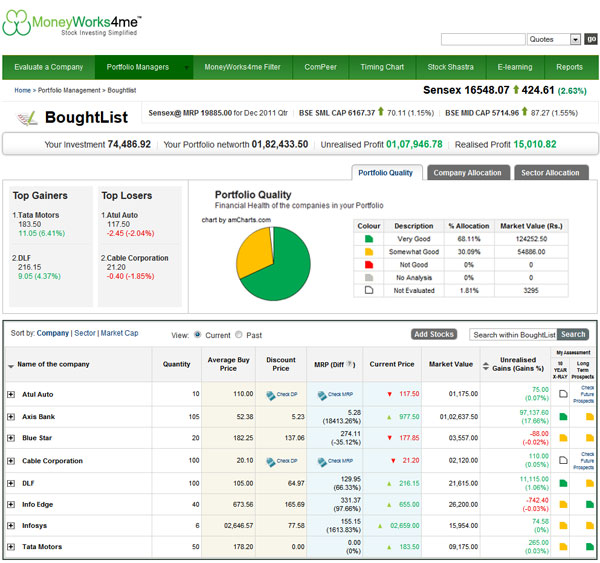
  1. View top gainers, top losers amongst your stocks and Portfolio quality of your BoughtList
  2. View the composition of your Portfolio: company-wise and sector-wise.
  3. View the current price details in relation to MRP and Discount Price to decide upon a course of action i.e. Buy, Hold or Sell.
  4. You can sort your Boughtlist on the basis of Sectors and Market Capitalization to get different vantage points.
  5. You can view colour coded assessment saved by you for 10 Year XRAY and Long-term future prospects and also other details such as sales, EPS, intraday price chart and news related to the concerned company, all at one place.
  6. Set buy & sell triggers for your bought stocks that can be sent to you via email or SMS.
  7. You can add companies that you have invested in directly into BoughtList or through EvaluatedList / WatchList.
BoughtList
Return to Top
About us
  • Who are we
  • How it Works
  • Stock Shastra
  • Contact Us
Products
  • Investor Pro 100
  • Investor 50
  • Investor 25
Usage Guidelines
  • Terms of Use
  • Disclaimer
  • Privacy Policy
  • Sitemap
Need Help?
  • Visit Help Section
  • View Demo
  • Help Videos
  • View Subscriber Experience
Connect with us!
  •  

Find out what our customers have to say about us
Pay online securly with  
Base Data and News provided by Accord Fintech Pvt. Ltd.
Price feed provided by www.nseindia.com and www.bseindia.com
Copyright © MoneyWorks4me 2011 | All Rights Reserved